What Release Verification Is and Why a Green CI Run Is Not Enough
Most software teams test their code thoroughly. Unit tests, integration tests, linters, type checks, builds on several operating systems. When all of that passes, the pipeline goes green and the release goes out.
But the tests check the code. They don’t check the release. And a release isn’t code: it’s a set of files, assembled at the very end by a few lines of script, that users download and run. Release verification means checking that set of files, as a whole, before it’s published.
Where Releases Go Wrong
Think about what happens after the tests pass. A matrix of build jobs compiles the program for each platform. Each job packs its build into an archive. Another job collects the archives, writes a checksums file and uploads everything. Every step is simple. Every step is also a place where the wrong file can end up in the right place.
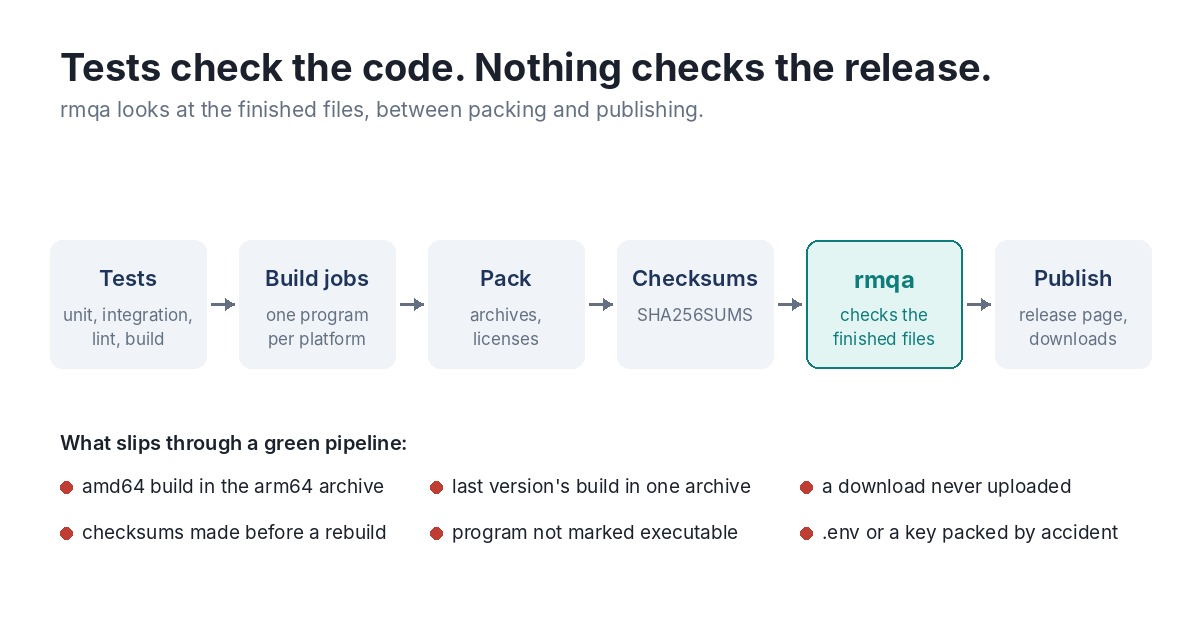
The mistakes that reach users follow a pattern:
- The wrong program in an archive. A copy step uses the wrong folder, a cache restores an old build, a cross-compile falls back to the host platform. The ARM archive ends up holding the Intel build. Every job was green.
- A stale build. One platform’s job didn’t rebuild, and the archive holds the previous version. It runs fine, which is the problem: nobody notices until a bug that was fixed comes back for some users only.
- A missing download. One job failed quietly or was skipped, and the release goes out without the Intel Mac file. The download page links to it anyway.
- Checksums that don’t match. An archive was rebuilt after the checksums file was written, or the file lists four of the five downloads. Users who verify, and package managers that verify automatically, get an error.
- Lost permissions. The program was packed without its executable bit, or zipped on Windows where Unix permissions aren’t stored. Users get “permission denied” and a support question follows.
- Things that shouldn’t be there. A
.envfile, a signing key, a.DS_Store. A packing script that takes a whole folder takes whatever is in it.
None of these would be caught by testing the code, because the code is fine.
What Verification Checks
Release verification looks at the files people will download and asks plain questions about each one. Is it there? Does it open? Is the program inside built for the platform in its name? Does it carry the version this release claims? Is it executable? Are the license files present? Does the checksums file agree with the files? Is there anything in the release that shouldn’t be?
The questions are simple. What makes them hard to answer by hand is that a release has many files and each archive has to be opened, and the answer has to be right every time, including at the end of a long day when the release is late.
How It Fits With Signing, SBOMs and Provenance
There’s a whole field of supply-chain tooling now, and each tool answers a different question:
- Build tools such as GoReleaser or cargo-dist produce the release files.
- Signing with Sigstore’s cosign, GPG or minisign proves who published a file and that it hasn’t changed since.
- Provenance, as in the SLSA framework, records how and where a file was built.
- An SBOM (software bill of materials) lists the components inside a program.
All of them describe or protect files that are assumed to be the right ones. A perfectly signed archive with the wrong program inside is still the wrong archive, now with a valid signature. Verification comes first: make sure the release is what you meant to ship, then sign it.
The Manifest Approach
The approach rmqa takes is to write down, once, what a release should contain: the platforms, the file names, the program inside each archive, the files that must ship with it. That description is the manifest. Every release is checked against it, automatically, before publishing.
The manifest is small because releases are regular. Five platforms with the same layout are one rule, not five. And it doesn’t have to be written from scratch: rmqa init reads a release you know is good and writes the manifest for you.
Once it’s in place, the check costs a few seconds and runs every time. The boring mistakes stop reaching users, because something finally looks at the release the way a user does: by opening it.